
How do you manage your artistic, musical, or other creative projects? Are you wanting a different way? I’ve tried a lot of different methods for project management in general. As far as music making, years and years ago, my approach was very unsophisticated and disorganized–scribblings across multiple journals (that would get lost and stolen), Word documents with difficult-to-decipher hints at chord progressions, and other random files that were unclear whether they contained a promising idea, bad idea, or something that was almost finished. The point is, I’m sure I lost a lot of ideas and could have written even more songs than I did. (I wrote around 100 songs in my 20s and 30s.)
Last September, when I decided to make what became Regretfulnot, I had various DAW project files all over my hard drive and Dropbox folders. I had similarly disorganized instrument samples that I’d purchased or found for free. I had gigabytes of field recordings across recorders (great backup habits, Scott) and several folders on my hard drive and Dropbox. Oh, and hours and hours of pretty random recordings of my playing mandolin or octave mandolin–scattered similarly to the field recordings. I was understandably overwhelmed by this somewhat controlled chaos. To get going, I just chose a few files that had something promising–a DAW project of a song I started because a tutorial or a cool mando riff I recorded, or an interesting field recording–came up with a random meaningless name, named a new folder that, and stuff that interesting something there as the starting point for the track. For some tracks, the idea already had a draft arrangement and multiple tracks of orchestration. For others, not so much.
After a bit, I had difficulty overcoming the inertia of this disorganization and not having a strategy for taking those interesting ideas to finished tracks. The advice on YouTube or in books I read was either a bit too “vibe-y” or over-simplified. Then I saw a webinar from Alexandre Joyal, who runs Metamind Music, about his Workflow Wizardry system. He had me at “workflow.” (Someone should also create a “Wizardry Workflow system.”)
Alex has devised a multi-stage, multi-step project management workflow (the project being turning music ideas into released tracks). He’s also implemented that system in Notion, a productivity and project management app. After listening to his talk, going through his Notion template, and feeling the need to control my chaotic approach even more, I hired him as a coach. I’ve taken instrument lessons and had therapists, but I’ve never had a coach. It’s been amazingly helpful.
So, using Alex’s project management approach and his Notion template—a full-blown project management system, really—I was able to wrestle my digital chaos into my album Regretfulnot. Maybe the album would have come together regardless, but not as efficiently and enjoyably. Also, probably not in a way that I’d feel like I could repeat and adapt to my way of working and my values.
Now, I’m working on a new album entirely from scratch. And I’m still working with Alex–he’s just that good. When we meet, I use his terminology and speak in terms of his workflow process. But for this go-around, I’m also adapting his system to suit myself (and maybe–hopefully–others, too; we all have different ways of connecting to concepts). I’m a former academic who loved to develop conceptual models. I can’t help myself, even for music-making project management.
Before I met Alex, I had a history with Notion. I’ve used it extensively in academic and consulting work and turned a lot of people onto it. But I’d also grown tired of it and had stopped using it. Notion’s great for big projects and teams. But it’s also often overkill, has what I think is a clunky user interface, and doesn’t let you store files and data locally on your hard drive or with services you already pay for, like Dropbox.
For my technology, I’ve settled on (yeah, right) on this combination:
- Dropbox, because I already use it and it integrates with a lot of other apps/services. Inside my music making Dropbox folder, I created….
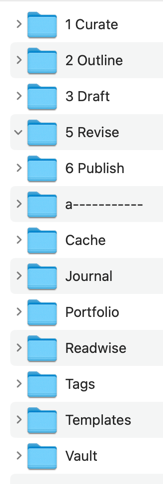
- verb-named folders (I treat them like a kanban board),
- noun-based folders (to store things like samples)
- Plain-text markdown files for notetaking. I keep those notes inside the most immediately relevant Dropbox folder.
- The app Obsidian for editing the notes and interacting with media. I also like Typora for editing markdown files.
- The utility Hookmark for linking the many kinds of files that go into making music these days, so I can quickly find related files that aren’t stored in the same folder. (It’s a great app for Mac users, but not critical to the workflow.)
Typora and Hookmark are Mac apps, but the other stuff works on Windows. And any text editor, not just Typora, can edit plain-text markdown files.
It sounds more complex than it is. Basically, I’m just using the folder structure to track my music, and I use markdown/plain-text files to take notes about anything in those respective folders. I can view those notes with Obsidian or other text editors. The nice thing about Obsidian is that I can play audio and video files in the same app.
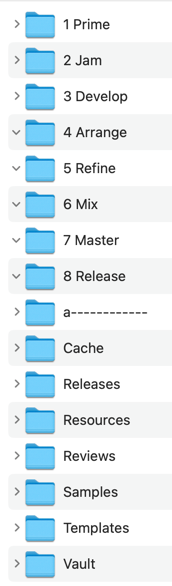
Here’s a screen grab of my music making folder in Dropbox. The folders with numbers are the verb-named, action-oriented folders. They sequence an eight-step process of going from musical idea to completed tracks. (The eight steps are essentially the same as in Alex’s Workflow Wizardry system, but with different names that make more sense to me.) The folders without a number are the object-based folders for longer-term storage. (Yeah, “a——-” creates some separation.) As I make progress on an idea-becoming-a-released-track, I move the project from one numbered folder to the next.
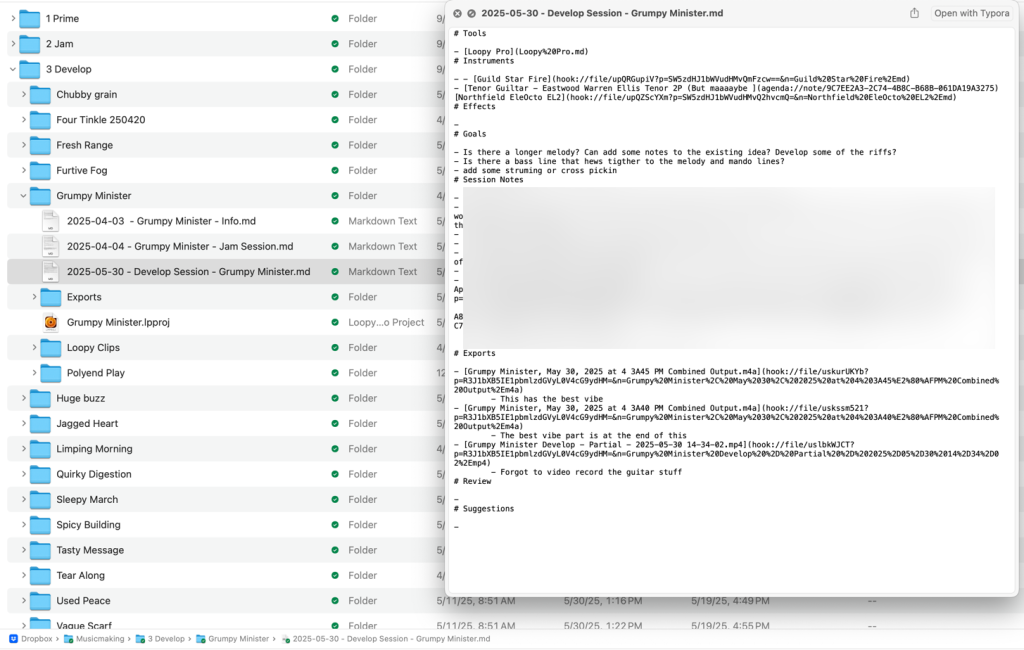
Here’s a screenshot of a musical idea I’m working on, which is (randomly) named Grumpy Minister, along with a preview of a related markdown note. I make a new note—a markdown file—every time I sit down to make progress on a track.
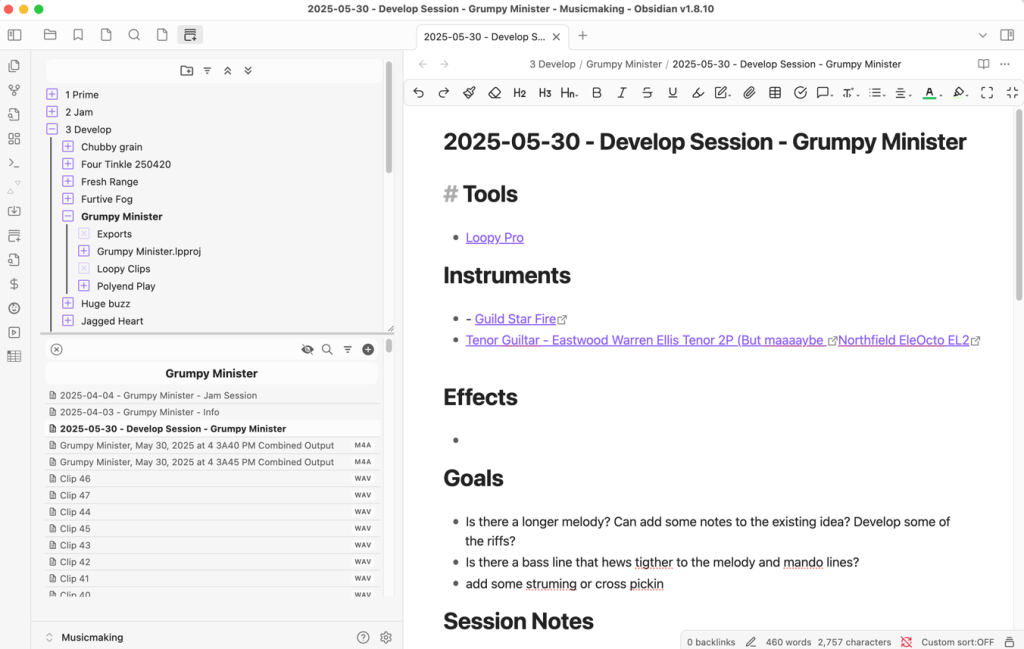
Here is the view of the same Dropbox folders but inside Obsidian. Notice how I can edit the notes and interact with the audio (and video) files.
So far, I’m digging this approach. It feels nice to be app-agnostic by embracing plain text files and simply using folders on my hard drive/Dropbox to organize everything. I’ve used many other notetaking and project management apps. They work (sometimes well) but can also get in the way since they weren’t developed for managing music production. Many such apps, like Notion, are much more complicated for less tech-savvy folks, like many musicians. I think my approach so far requires less learning of new tools (Obsidian isn’t even necessary) and doesn’t require an extra subscription or app purchase (Obsidian is free, there are many free text editors, and most people already pay for some cloud storage service), and is highly adaptable.
Oh, and if you’re wondering, I do take a similar approach to organizing other work and even personal/home stuff. Here’s my folder for making promo content, like this blog post.
Maybe there’s something in my system that can help your work. Definitely, get in touch if you have any questions.